 RonOnCrypto
Futures order types: limit, market, stop limit and stop market explained
On this page · 10
- What is a limit order?
- What is a market order, and how does slippage happen?
- What is a stop market order?
- What is a stop limit order, and why can it fail to fill?
- Where does each order sit relative to the current price?
- Do triggers use mark price or last price?
- What are take profit and stop loss orders attached to a position?
- What are reduce-only, post-only and GTC, IOC, FOK?
- How does order type affect maker and taker fees?
- Checklist: choosing an order type for a futures trade
Need leverage, liquidation price and take-profit targets? Open the full calculator.
Futures have four core order types: a limit order fills at your price or better, a market order fills immediately against the order book, and stop limit and stop market orders wait for a trigger price before placing a limit or a market order.
Limit protects price but may not fill; market fills but does not protect price. This guide covers, in order: a summary table of the four types, how each works with worked numbers, where each order sits relative to the current price, whether triggers use mark price or last price, take profit and stop loss attached to a position, the reduce-only, post-only, GTC, IOC and FOK options, how order type drives maker and taker fees, and a checklist for picking an order type. The short version: choosing an order type means choosing between certainty of fill and control of price, and stop losses usually need the certainty.
| Order type | When it reaches the book | Fill price | Guaranteed to fill | Typical fee |
|---|---|---|---|---|
| Limit | As soon as you place it | Your price or better | No, may not fill or fill partly | Maker if it rests, taker if it fills at once |
| Market | As soon as you place it | Best prices on the book, can slip | Almost, if the book has liquidity | Taker |
| Stop market | When price hits the trigger | Like a market order, can be worse than the trigger | Almost, once triggered | Taker |
| Stop limit | When price hits the trigger | The limit price or better | No, can be skipped when price gaps | Maker or taker, depending on when it fills |
The examples use the standard trade from the other guides on this site: a 1,000 USDT account, 1% risk (10 USDT), BTC long at 80,000, stop at 79,200, 0.05% fee per side, a position of 909.50 USDT (0.01136875 BTC), 10x leverage, 90.95 USDT margin, isolated margin, 0.5% maintenance margin and an estimated liquidation price of 72,400. Order books and price paths below are simulated to show the mechanics; they are not market data.
What is a limit order?
A limit order is an order to buy at no more than a set price, or to sell at no less than a set price. That is the definition in Wikipedia, Order (exchange) (accessed 12 November 2026), and the US SEC’s Investor.gov adds that a limit order is not guaranteed to execute (Understanding Order Types, accessed 12 November 2026).
Say BTC trades at 80,000 and you place a buy limit at 79,800 (an illustrative level). The order rests on the book and fills only if someone sells at 79,800 or lower. If price dips to 79,850 and turns back up, nothing fills and you have no position.
Two details trip people up. A buy limit placed above the best ask (a buy limit at 80,100 with the best ask at 80,000) fills straight away at 80,000, acting like a market order with a price cap. And a limit order can fill only partly if there is not enough size on the other side at that level.
What is a market order, and how does slippage happen?
A market order buys or sells immediately at the best prices available on the order book; it almost always fills, but the fill price is not guaranteed. Investor.gov states plainly that the execution price of a market order is not guaranteed (accessed 12 November 2026). The gap between the price you saw when you clicked and your average fill is slippage.
Slippage happens because a market order eats through the book level by level. A simulated ask side of a BTC/USDT contract:
| Ask price | Size resting | Taken by a 0.01136875 BTC market buy |
|---|---|---|
| 80,000 | 0.005 BTC | 0.005 BTC |
| 80,010 | 0.004 BTC | 0.004 BTC |
| 80,030 | 0.010 BTC | 0.00236875 BTC |
| Average fill | 80,009.77 |
The 909.50 USDT market buy averages 80,009.77, about 0.012% above 80,000, an extra 0.11 USDT. At this size slippage is small; with a much larger order, a thin book or a news spike, a market order can sweep many more levels and slip much further.
What is a stop market order?
A stop market order rests at a trigger (stop) price; when price reaches that level, it becomes a market order. Wikipedia describes a stop order as becoming a market order at the stop price, so it will execute, but not necessarily at or near the stop (accessed 12 November 2026). Investor.gov warns the fill can deviate significantly from the stop price (accessed 12 November 2026).
Stop market is the usual choice for a stop loss because it prioritises getting out. In the standard trade, a sell stop market at 79,200 that fills exactly at 79,200 loses 10.00 USDT including both fees, the full 1% risk. If the market moves fast and it fills at 79,150, the loss is 10.57 USDT (1.06% of the account), the same figure used in the guide to mark price vs index price.
A stop market also works for breakout entries: a buy stop above the current price (80,400 as an illustration) opens a long only if price rises into it. How to place the stop from price structure and size the trade at 909.50 USDT is covered in the stop loss guide.
What is a stop limit order, and why can it fail to fill?
A stop limit order has two prices: when price reaches the trigger, the platform places a limit order at your limit price, so the fill is never worse than the limit, but the order may not fill at all. Investor.gov notes that a stop limit order may not execute if price moves away from the limit (accessed 12 November 2026).
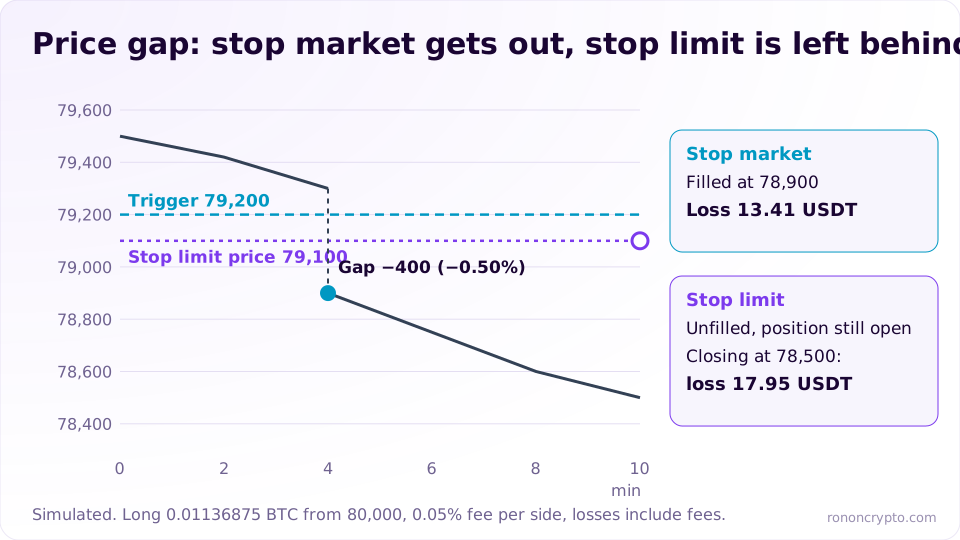
A simulated scenario: the standard long from 80,000, price at 79,300, then a burst of large sells makes the next trade print at 78,900, a 400 USDT gap (−0.50%) in one step, before price drifts on to 78,500.
- Stop market, trigger 79,200: triggered, the market order fills at 78,900. The loss is 13.41 USDT including fees (1.34% of the account) instead of 10 USDT, but the position is closed.
- Stop limit, trigger 79,200, limit 79,100: triggered, but the 79,100 sell limit sits above the market, so no buyer fills it. The position stays open; closing at 78,500 would cost 17.95 USDT including fees (1.80% of the account), and more if price keeps falling.
- If price bounces back to 79,100: the limit fills for a loss of 11.14 USDT. A stop limit only saves price if the market returns to the limit.
A limit set further from the trigger (say 78,800) fills more often but accepts a worse price; a limit right next to the trigger protects price but is easier to skip. In every case, the 79,200 stop sits 6,800 USDT above the 72,400 liquidation price, so a gap of a few hundred USDT does not push the standard trade toward liquidation; how 72,400 is calculated is in the guide to liquidation price.
Where does each order sit relative to the current price?
Limit orders sit on the side that is better for you (buy below, sell above the current price), while stop orders sit on the side that is worse (buy above, sell below the current price). This rule explains at a glance why take profits are usually limits and stop losses are usually stops.
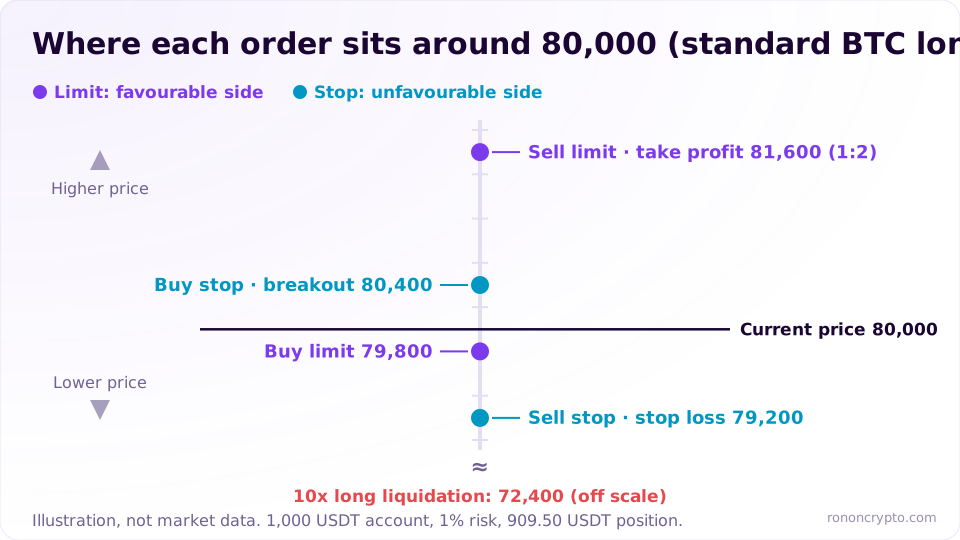
| Goal | Side of price | Order type | Illustrative level |
|---|---|---|---|
| Buy cheaper than now | Below 80,000 | Buy limit | 79,800 (−0.25%) |
| Buy if price breaks out | Above 80,000 | Buy stop (market or limit) | 80,400 (+0.50%) |
| Take profit on a long | Above 80,000 | Sell limit or take-profit order | 81,600 (1:2 R:R) |
| Stop loss on a long | Below 80,000 | Sell stop (market or limit) | 79,200 (−1.00%) |
A short flips everything: the take profit is a buy limit below, the stop loss a buy stop above. Place an order on the wrong side, such as a sell stop above the current price, and many platforms reject it or trigger it instantly.
Do triggers use mark price or last price?
Stop orders on futures trigger on whichever price type the platform sets or lets you choose, usually last price, mark price or index price. Deribit’s public API documentation for its buy and sell endpoints (accessed 12 November 2026) lists exactly these three values, index_price, mark_price and last_price, as the trigger for stop-loss, take-profit and trailing orders.
A last-price trigger reacts fast but is easy to wick out; a mark-price trigger is harder to wick out but lags in a real drop. The trigger only decides when the order is placed; the order still fills on the book at real prices. The 12-minute wick scenario and a checklist for choosing a trigger type are in the guide to mark price vs index price.
What are take profit and stop loss orders attached to a position?
Attached take profit (TP) and stop loss (SL) orders are a pair of conditional orders you set together with the entry; the platform places them once the entry fills, and they normally only close that position. Under the hood, a take profit is usually a limit order or a “take” trigger order (placed when price moves in your favour), and a stop loss is usually a stop market or stop limit. Deribit’s API, for instance, lists take_limit and take_market next to stop_limit and stop_market (accessed 12 November 2026).
In the standard trade, a take profit at 81,600 (1:2 R:R) earns about 17.27 USDT after fees, and the stop at 79,200 loses 10.00 USDT including fees. When one side fills completely, the other is usually cancelled, but this behaviour differs between platforms, so check your open orders after the position closes. Choosing a take-profit ratio is covered in the risk reward ratio guide; dedicated guides on TP/SL and trailing stops will link back here.
What are reduce-only, post-only and GTC, IOC, FOK?
These are options added on top of an order: reduce-only limits an order to shrinking a position, post-only forces a limit order to rest on the book, and GTC, IOC and FOK are time-in-force settings that decide how long an order lives. Not every platform offers all of them, and the labels vary.
Reduce-only
Reduce-only is an option that lets an order close part or all of an existing position but never add to it or flip it. Deribit’s API describes the flag as “intended to only reduce a current position” (accessed 12 November 2026). Example: you hold a 0.01136875 BTC long and mistakenly place a 0.02 BTC take-profit sell. Without reduce-only, the extra 0.00863125 BTC opens a new short (about 704.31 USDT at 81,600); with reduce-only, the order closes exactly 0.01136875 BTC.
Post-only
Post-only is a limit-order option that guarantees the order enters the book as a resting (maker) order; if it would fill immediately, the platform rejects it or reprices it to rest. Deribit’s API documents both behaviours: by default a post-only order that would take liquidity is repriced to just below the spread, and with reject_post_only it is rejected instead (accessed 12 November 2026). Example: with the best ask at 80,000, a post-only buy limit at 80,010 would fill at once, so it is rejected or moved below 80,000.
Time in force: GTC, IOC, FOK
Time in force sets how long an unfilled order stays live. According to Wikipedia (accessed 12 November 2026):
- GTC (Good Till Cancelled): stays on the book until it fills or you cancel it. The common default for limit orders.
- IOC (Immediate or Cancel): fills whatever it can immediately and cancels the rest.
- FOK (Fill or Kill): fills in full immediately or is cancelled entirely.
Against the simulated book above, a 0.01136875 BTC buy limit at 80,010 set to IOC fills 0.009 BTC (the 80,000 and 80,010 levels) and cancels the remaining 0.00236875 BTC; set to FOK, it is cancelled entirely because there is not enough size at 80,010 or below.
How does order type affect maker and taker fees?
An order that rests on the book before filling is a maker order (it adds liquidity), and an order that fills immediately against resting orders is a taker order (it removes liquidity); taker fees are usually higher than maker fees. The maker and taker definitions follow QuestDB’s Maker-taker model glossary (accessed 12 November 2026). Market and stop market orders are always takers; a limit order is a maker if it rests, but a taker if it crosses the spread and fills at once.
An illustration with a 0.02% maker and 0.05% taker fee (illustrative rates; every platform publishes its own schedule) on the 909.50 USDT position:
| Entry and exit | Entry fee | Exit fee | Total |
|---|---|---|---|
| Market in, market out | 0.455 USDT | 0.455 USDT | 0.910 USDT |
| Limit in (maker), stop market out | 0.182 USDT | 0.455 USDT | 0.637 USDT |
| Limit in, limit out (both maker) | 0.182 USDT | 0.182 USDT | 0.364 USDT |
The 909.50 USDT size assumes 0.05% on both sides, so entering with a 0.02% maker order brings the loss at the stop to about 9.73 USDT instead of 10.00 USDT. Small per trade, but it compounds with the number of trades per month; estimate monthly costs with the trading fee calculator, and see base-tier maker and taker rates on the futures exchange fees compared page. Maker and taker fees will get their own guide.
Checklist: choosing an order type for a futures trade
To pick an order type, answer 5 questions: do you need a guaranteed fill or a guaranteed price, is the order an entry or an exit, which price triggers it, does it need reduce-only, and how much slippage can you accept.
- Entry with no rush: a limit order (optionally post-only) gives a better price and fee, at the cost of possibly not filling.
- Entry you need now: a market order; check book depth and your size before you click.
- Stop loss: a stop market prioritises getting out; a stop limit only fits if you accept the risk of no fill and set the limit far enough from the trigger.
- Any exit: turn on reduce-only so the order cannot open an accidental position the other way.
- Before you click: recompute the loss with slippage; a stop market filling at 78,900 instead of 79,200 loses 13.41 USDT, not 10 USDT.
The order type only decides how the order fills; the loss when you are wrong is still set by position size. Work out size, margin and liquidation price from your account, entry and stop with the position size calculator before choosing the order type.
This content is for educational purposes only and is not investment advice. Trading leveraged derivatives carries the risk of losing your entire margin.
FAQ
Is a limit order always a maker order?
No. A limit order is a maker order only if it rests on the book before it fills. A buy limit placed above the best ask fills immediately at that ask and is usually charged the taker fee. Use post-only if you want the order rejected or repriced rather than filled as a taker.
What do you enter when placing a stop limit order on futures?
Usually four things: the trigger (stop) price, the limit price, the quantity and, where the platform offers a choice, the price type that triggers it (last price or mark price). For a stop loss, also tick reduce-only so the order can only shrink the open position.
Does a stop market order always fill?
It almost always fills once triggered, as long as the book has liquidity, because it becomes a market order. The fill price is what is not guaranteed: in a fast market it can land well below the trigger on a long stop.
Can a limit order slip?
Not in the sense of filling worse than your price, because a limit order only fills at that price or better. Its risk is the opposite: it may not fill, or may fill only partly, so you can miss a move even with the right level.
Does an open order disappear if you close the app?
No. Open orders live on the platform's matching engine, not on your phone. A GTC order stays live until it fills or is cancelled; some platforms cancel related orders automatically once a position closes, so check your open orders after every trade.
Derivatives trading can lose you your entire margin. See the disclaimer.