 RonOnCrypto
Take Profit and Stop Loss in Crypto Futures: How TP/SL Orders Work and How to Set Them
On this page · 8
- How is a TP/SL order different from a regular stop order?
- When do the take profit and stop loss trigger?
- Do TP/SL orders trigger on mark price or last price?
- Should you set TP/SL by price or by ROE%?
- How do the take profit and stop loss cancel each other?
- Reduce-only vs close position: what is the difference?
- How do partial take profits work?
- Checklist: setting TP/SL on a futures trade
- Break-even win rate, before fees
- -
- Break-even win rate, after 0.05% fees per side
- -
- Expectancy per trade, after fees
- -
- After 100 trades like this
- -
Take profit (TP) and stop loss (SL) orders are a pair of conditional orders attached to a futures position: the take profit closes the position when price reaches the profit level you chose, and the stop loss closes it when price reaches the loss you accept. When the two are linked, one filling cancels the other.
The guide to futures order types covers limit, market, stop limit and stop market orders and touches on TP/SL briefly. This guide goes deeper into the TP/SL pair itself: how it differs from a standalone stop, when each side triggers, which price triggers it, whether to set it by price or by ROE%, how one-cancels-the-other (OCO) works, reduce-only versus close position, partial take profits, and a checklist. The short version: set TP/SL by chart price rather than ROE%, and make sure every TP/SL order can only reduce the position.
| Component | What it does | In the standard trade |
|---|---|---|
| Take profit (TP) | Closes the position when price moves in your favour | Sell at 81,600 (1:2 R:R), about 17.27 USDT profit after fees |
| Stop loss (SL) | Closes the position when price moves against you | Sell at 79,200, 10.00 USDT loss including fees |
| Trigger price type | The price that triggers it: last price, mark price, and on some platforms index price | Depends on the platform; check the default |
| Order after trigger | Becomes a market order or a limit order | SL market prioritises the exit, TP limit protects price |
| OCO link | One order filling cancels the other | Hitting 81,600 cancels the 79,200 stop |
| Reduce-only | The order can only shrink the position, never open a new one | No accidental short |
| Set by | Price, or ROE% converted to price | At 10x, ROE −10% (before fees) maps to 79,200 |
The examples use the standard trade from the other guides on this site: a 1,000 USDT account, 1% risk (10 USDT), BTC long at 80,000, stop at 79,200, 0.05% fee per side, a 909.50 USDT position (0.01136875 BTC), 10x leverage, 90.95 USDT margin and an estimated liquidation price of 72,400. Price paths below are simulated to show the mechanics; they are not market data.
How is a TP/SL order different from a regular stop order?
A TP/SL order is a conditional order the platform attaches to a position or to an entry order, built to close that position; a standalone stop order is independent and, without reduce-only, can open a new position. That is the core difference: a TP/SL knows which position it belongs to, while a plain stop only knows whether it buys or sells.
TP/SL is usually set in one of two ways:
- Attached to the entry: you enter the take profit and stop loss together with the entry order, and the platform places them only after the entry fills. Deribit’s public API documentation calls this one-triggers-one-cancels-other (OTOCO): the primary order triggers two secondary orders, a stop loss and take profit pair, where one filling cancels the other (accessed 19 November 2026).
- On an open position: you enter first and add TP/SL to the position afterwards. This suits a market entry where you measure the exits once you are in.
A take profit is an order that closes a position when price reaches a profit level set in advance, so the gain is locked in as realised PnL instead of sitting as unrealised PnL. The stop loss is the other side; how to place it from price structure and size the trade at 909.50 USDT is covered in the stop loss guide.
When do the take profit and stop loss trigger?
On a long, the take profit (a sell) triggers when price rises to or above the TP level, and the stop loss (also a sell) triggers when price falls to or below the SL level; on a short, both are reversed. Binance’s public USDⓈ-M futures API documentation states exactly these conditions: a sell take-profit order triggers when the latest price is ≥ the trigger price, and a sell stop order triggers when the latest price is ≤ the trigger price (accessed 19 November 2026).
| Position | Order | Side | Triggers when | Standard level |
|---|---|---|---|---|
| Long from 80,000 | TP | Sell | Price ≥ 81,600 | +2.00% |
| Long from 80,000 | SL | Sell | Price ≤ 79,200 | −1.00% |
| Short from 80,000 | TP | Buy | Price ≤ 78,400 | −2.00% |
| Short from 80,000 | SL | Buy | Price ≥ 80,800 | +1.00% |
The standard short with the same 10 USDT risk has a size of about 908.68 USDT. Once triggered, the TP or SL becomes a market or a limit order, whichever you chose, and the difference matters most on the take profit:
- Take profit market: it gets you out, but the fill can be worse than the trigger. In a simulated spike through 81,600 that reverses, a fill at 81,570 leaves 16.93 USDT profit instead of 17.27 USDT (0.34 USDT less).
- Take profit limit: it fills at 81,600 or better, or not at all if price only touches the level and turns. A missed take profit costs unbanked profit; it does not push the loss beyond 1R.
That is why the two sides often use different order types: a stop market prioritises getting out, a take profit limit prioritises price. The gap scenario where a stop limit fails to fill (17.95 USDT lost instead of 10 USDT) is in the guide to futures order types.
Do TP/SL orders trigger on mark price or last price?
TP/SL orders trigger on whichever price type the platform sets or lets you choose: last price, mark price and, on some platforms, index price. Deribit’s API lists all three for stop-loss, take-profit and trailing orders; Binance’s USDⓈ-M futures API offers mark price or contract price (the last traded price), with contract price as the default (both accessed 19 November 2026). Defaults differ between platforms, so check before you place the order.
On the take-profit side, the trigger type decides whether a brief spike banks the profit. Simulated: the last price spikes to 81,650 for a moment and drops back, while the mark price peaks at only 81,520. A take profit at 81,600 triggered by last price runs and locks in the profit; the same take profit triggered by mark price does not run, and the position stays open.
On the stop-loss side the logic flips: a last-price trigger is easy to wick out, while a mark-price trigger is harder to wick out but lags in a real drop. The trigger only decides when the order is placed; the order still fills on the book at real prices. The wick scenario and a checklist for choosing a stop trigger are in the guide to mark price vs index price.
Should you set TP/SL by price or by ROE%?
Setting TP/SL by price ties the exit to the chart; setting it by ROE% ties the exit to leverage, so the same ROE number gives a different price and a different loss at every leverage level. ROE is profit or loss divided by the position’s margin, and margin changes with leverage. Converting ROE% (before fees) to a price on a long:
- SL price = Entry × (1 − ROE% ÷ Leverage)
- TP price = Entry × (1 + ROE% ÷ Leverage)
A short flips the signs: at 10x, an “ROE −10%” stop on a short from 80,000 is 80,800 and an “ROE +20%” take profit is 78,400. The table keeps the position at 909.50 USDT and changes only the leverage:
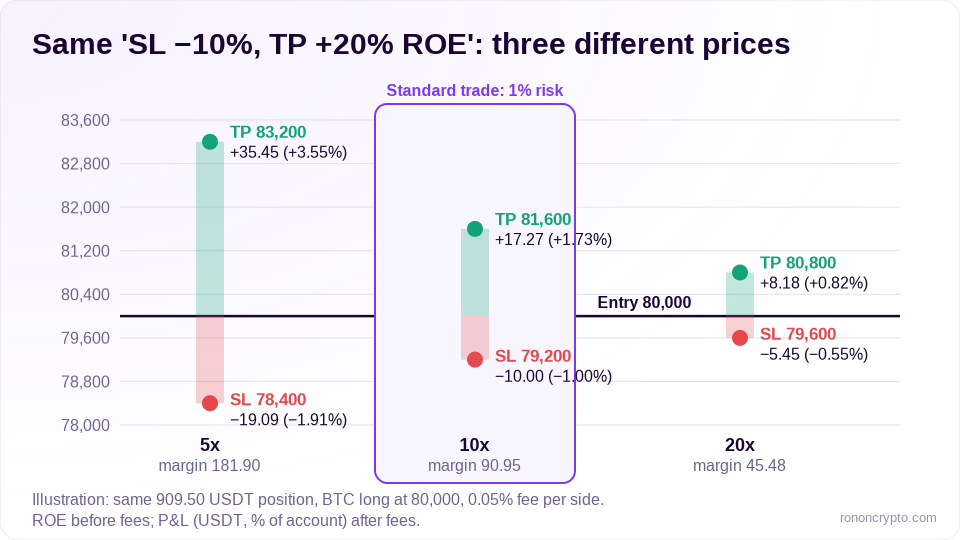
| Leverage | SL at “ROE −10%” | Loss at SL | TP at “ROE +20%” | Profit at TP |
|---|---|---|---|---|
| 5x | 78,400 | −19.09 USDT (−1.91% of account) | 83,200 | +35.45 USDT (+3.55%) |
| 10x | 79,200 | −10.00 USDT (−1.00%) | 81,600 | +17.27 USDT (+1.73%) |
| 20x | 79,600 | −5.45 USDT (−0.55%) | 80,800 | +8.18 USDT (+0.82%) |
The same “SL at −10% ROE” loses almost twice the planned 1% at 5x, and at 20x it puts the stop close enough for ordinary noise to reach it. Leverage does not change the position size, only the margin; once the size has been worked out from the stop price, the stop has to be entered at that exact price.
One more gap: the table assumes ROE before fees. After fees, as the site’s PnL and ROE calculator computes it, the 79,200 stop at 10x is an ROE of −11.00% and the 81,600 take profit is +18.99%. Because ROE moves with leverage, read profit and loss in USDT and as a share of the account, not as ROE.
How do the take profit and stop loss cancel each other?
When the take profit and stop loss are linked as OCO (one cancels the other), one order filling cancels the other automatically; without that link, the remaining order can stay live after the position has closed. Deribit’s support documentation describes it this way: once the primary order fills, the stop loss and take profit are linked via OCO, and once either one triggers, the other is cancelled (accessed 19 November 2026).
Partial fills are where platforms differ. Deribit’s API offers three fill conditions for linked orders: act on the secondary orders at the first fill of the primary, only when the primary fills completely, or adjust them in proportion to each partial fill (accessed 19 November 2026). Read the rules where you trade before assuming the leftover order “just disappears”.
The real risk is an orphaned order. A simulated sequence with the standard trade:
- You close the long manually at 80,800 for 8.18 USDT profit after fees.
- The 0.01136875 BTC sell stop at 79,200 is still live, without reduce-only.
- Price falls to 79,200: the order triggers and opens a new short worth about 900.41 USDT.
- Price bounces to 80,000, and the unintended short closed there loses 10.00 USDT.
The two trades net −1.82 USDT instead of +8.18 USDT. The fix is to turn on reduce-only for every TP/SL order and check your open orders after every manual close.
Reduce-only vs close position: what is the difference?
Reduce-only limits an order to shrinking the position by the exact quantity you enter, while the close-position option closes whatever position exists at the moment it triggers, regardless of quantity. Binance’s USDⓈ-M futures API documentation describes close position as working with stop market and take profit market orders, closing the whole long when the order is a sell, and not combinable with a quantity (accessed 19 November 2026). The reduce-only definition and a wrong-quantity example are in the guide to futures order types.
The difference shows when the position size changes after the stop is set. Simulated: you add another 0.01136875 BTC at 80,400, so the position becomes 1,823.55 USDT with an average entry of 80,200.
- Reduce-only stop still sized at 0.01136875 BTC: hitting 79,200 closes only half the position; the other half has no stop.
- Close-position stop: hitting 79,200 closes everything, for a total loss of 24.55 USDT including fees, 2.46% of the account instead of 1%.
Neither option fixes the root problem: adding to the trade has already pushed risk beyond the plan. Every time the size changes, recompute the loss at the stop, because the loss at the stop is set by position size, not by the order type.
How do partial take profits work?
A partial take profit splits the position into several reduce-only TP orders at different prices, with the sizes adding up to no more than the position. For example, split the standard trade into three equal parts of 0.00378958 BTC each, taking profit at 80,800 (1:1), 81,600 (1:2) and 82,400 (1:3). Each part makes about 2.73, 5.76 and 8.79 USDT after fees.
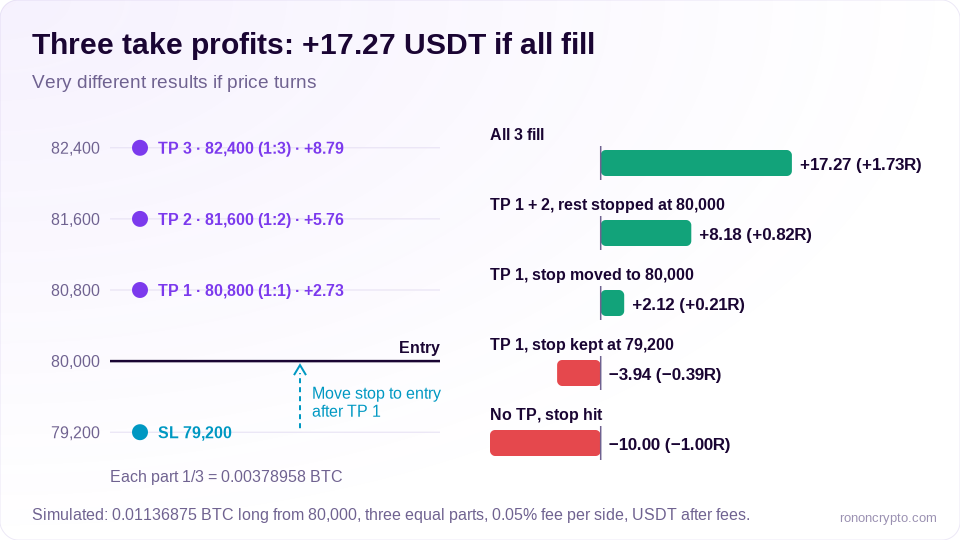
| Scenario | Whole-trade result | In R |
|---|---|---|
| All 3 take profits fill | +17.27 USDT | +1.73R |
| TP 1 and 2 fill, the rest stops out at the 80,000 entry | +8.18 USDT | +0.82R |
| TP 1 fills, stop moved to 80,000 and hit | +2.12 USDT | +0.21R |
| TP 1 fills, stop kept at 79,200 and hit | −3.94 USDT | −0.39R |
| No take profit fills, stop at 79,200 hit | −10.00 USDT | −1.00R |
All three filling gives exactly 17.27 USDT, the same as one take profit at 81,600, because three equal parts at 1:1, 1:2 and 1:3 average out to 1:2. What splitting changes is the distribution of outcomes: fewer trades lose a full 1R, but winners tend to be smaller. Moving the stop to entry after the first take profit means each remaining part loses only about 0.30 USDT in fees if hit. The expectancy side of partial take profits is in the risk reward ratio guide.
Two technical details to check when you split. Each part has to round to the contract’s minimum quantity step, so a three-way split is rarely perfectly even. And after each take profit fills, the stop’s quantity has to shrink with it, or the stop has to be a close-position order, so no orphaned order is left behind.
Checklist: setting TP/SL on a futures trade
Before you click, check 7 things: a stop from price structure, size from the stop, a take profit measured in R, the trigger price type, the order type after trigger, reduce-only, and where the stop sits against liquidation.
- Stop first: place it at the level where, if reached, the reason for the trade no longer holds.
- Size from the stop: size the position so hitting the stop loses exactly your chosen risk, such as 909.50 USDT for 10 USDT.
- Take profit by price, measured in R: enter the take profit as a price, then see how many R it is worth after fees; do not enter it as ROE%.
- Trigger price type: check whether the default is last price or mark price, for both the take profit and the stop.
- Order type after trigger: a stop market if getting out matters most; a take profit limit if price matters and you accept a possible miss. Market exits pay the taker fee; base-tier maker and taker rates are on the futures exchange fees compared page.
- Reduce-only or close position: turn it on for every TP/SL order; take-profit sizes must not add up to more than the position.
- Stop before liquidation: the 79,200 stop must sit between entry and the 72,400 liquidation price (see the last FAQ).
After every manual close, every add and every partial take profit, reopen your open orders and update the stop. The position size calculator takes your account, risk %, entry, stop, leverage and fee, and returns the size, margin, liquidation price and a table of take-profit prices at 1:1, 1:2, 1:3, 1:5 and 1:10 with profit after fees; the PnL and ROE calculator shows the profit or loss after fees and the ROE at the exact TP or SL price you plan to use.
This content is for educational purposes only and is not investment advice. Trading leveraged derivatives carries the risk of losing your entire margin.
FAQ
Do TP/SL orders cost a fee?
Placing them is usually free; the fee is charged only when the order fills, like any closing trade. A take profit market or stop market order fills against resting orders and pays the taker fee: at 0.05%, the exit fee on 0.01136875 BTC at 81,600 is about 0.46 USDT, already deducted from the 17.27 USDT profit. A take profit placed as a resting limit order may be charged the lower maker fee, depending on the platform's fee schedule.
Can you change TP/SL after the trade is open?
Usually yes: you can move, cancel or re-place them on the open position. Moving the stop to entry leaves only fees at risk; moving it further away while keeping the size makes the loss exceed the plan, for example a stop moved from 79,200 to 78,400 loses about 19.09 USDT instead of 10 USDT.
How is a trailing stop different from a regular stop loss?
A regular stop loss stays at one price, while a trailing stop follows price at a fixed callback distance. In a simulated example, a trailing stop activated at 81,600 with a 1% callback, after price peaks at 82,000 and reverses, closes around 81,180 for about 12.50 USDT after fees if it fills at that level. Binance's public futures API documentation allows callback rates from 0.1% to 20% (accessed 19 November 2026).
Do you have to set both a take profit and a stop loss?
Technically no. The stop loss defines the maximum loss (1R), so without it a position sized at 1% risk no longer means anything. The take profit can be replaced by a trailing stop or a manual exit, as long as the exit rule is written down before entry rather than decided while price is moving.
What happens if the stop loss is below the liquidation price?
It never runs, because the position is liquidated first. The standard 10x long has an estimated liquidation price of 72,400; a stop at 72,000 is useless, and the position loses about 91.40 USDT (90.95 USDT margin plus the entry fee) instead of 10 USDT. The standard 79,200 stop sits 6,800 USDT above liquidation.
Derivatives trading can lose you your entire margin. See the disclaimer.